

- Script tier: a bare
.lua/.luaufile, norebind.tomlanywhere above it. The modeline comment at the top of the file owns all configuration. - Package tier: a directory (or any ancestor of the script) containing
rebind.toml. The toml is package truth: it owns identity and can set every runtime option, overriding the entry’s modeline.
rebind init a package and move it in. Nothing about the code changes.
Layout
main.luau, then main.lua. requires resolve inside
the package root: <mod>.luau, <mod>.lua, <mod>/init.luau, <mod>/init.lua.
rebind.toml
[runtime] values are checked by the same rules as modeline values, so an
unknown instance or a tick_rate above 8000 is an error, not a silent
default. name, version, and min_sdk belong under [package] and are
refused under [runtime].
The toml key is permissions (a list). In a modeline, permission= and
permissions= behave identically: either takes one value or a comma-separated
list, and every line adds to the set. An empty set means “declared, needs
nothing”: permissions = [] in the toml, or permissions=none (or a bare
permissions=) in a modeline. Omitting the key entirely is the opposite, and
grants every permission. See
Permissions.
A package you intend to publish must declare the key. The registry refuses a
version that leaves it undeclared, since “undeclared” reads as every
permission, and rebind check fails it offline once [marketplace] is
present. Declaring the empty set is always available for a script that needs
nothing.
Publishing adds a third section, [marketplace]. It is only read by rebind check and rebind publish, never by the runtime: see
the marketplace listing.
Precedence: toml over modeline
Inside a package, the entry’s modeline still works (an entry can run standalone during development), but any key also set inrebind.toml wins, and the
collision is surfaced as a warning on the script’s log channel. A bare script outside any package declares min_sdk in its modeline.
Scripts inside a package
Any script under a package root (for examplescripts/wiggle.luau) runs in that
package’s context, with deliberate limits:
So a one-shot helper needs zero boilerplate:
exit() (alias for Script.Exit()) ends the script cleanly when it’s done.
Importing from GitHub
A package in a public GitHub repository installs from the app. In the Scripts tab, open More file actions above the file list and choose Import from a link, then paste the repository link. Therebind.toml must
sit at the top of the repository. A /tree/<ref> link takes a branch or a tag,
and the ref may contain slashes. Packages inside a folder are not supported.
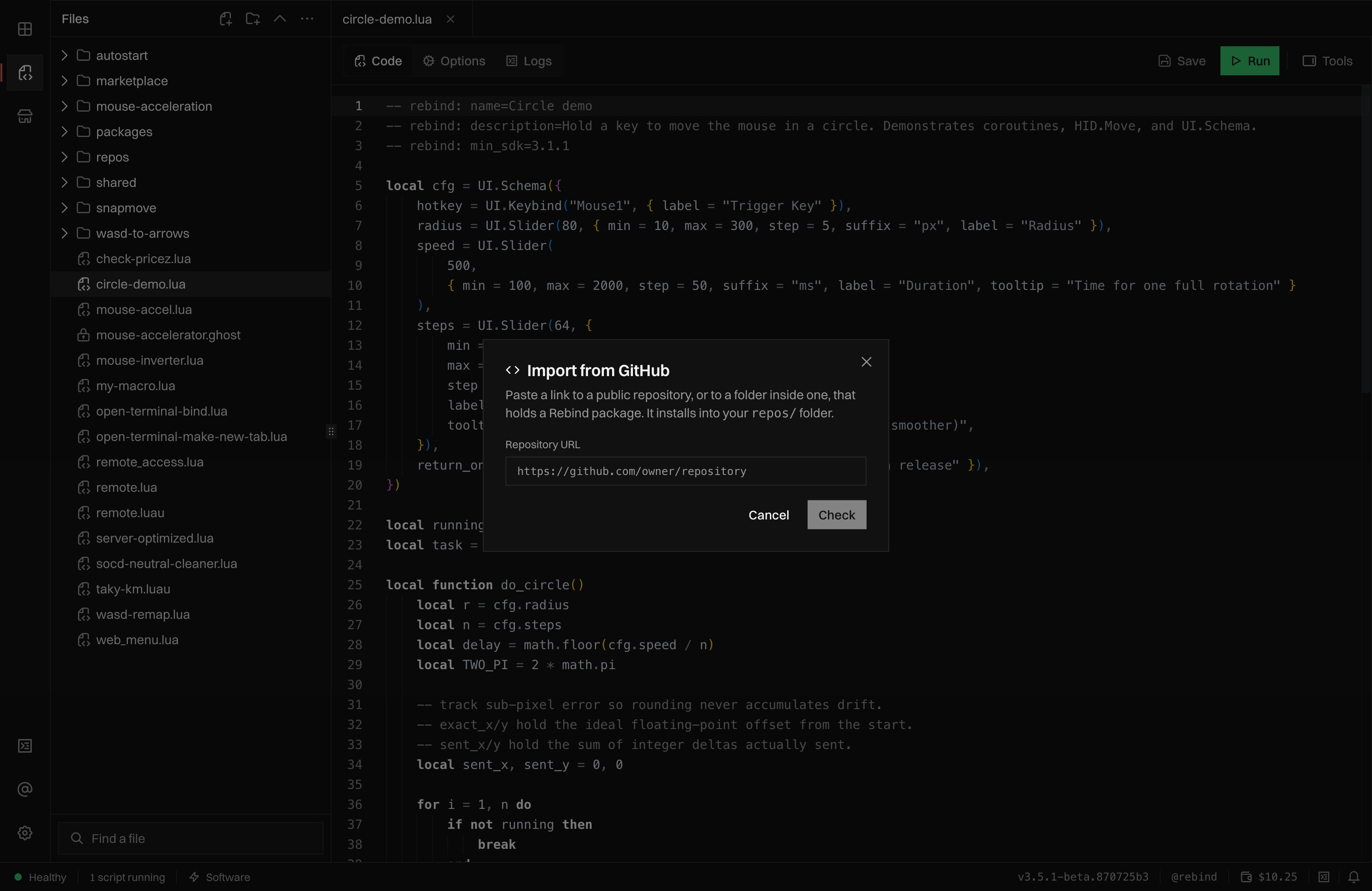
Import from a link: paste a public repository link, then Check before anything installs.
rebind.toml exists. Nothing is downloaded yet. Download and check fetches
it and shows the package name, version, file count, commit, and requested
permissions before anything is written. Import installs that exact commit
under repos/<repo> in your scripts folder. Rebind has not reviewed this code,
so import only from authors you trust. To pull a newer commit later, right-click
the folder, choose Fetch update, and confirm with Replace. Local edits
in that folder are replaced too. A folder imported by an earlier version still
fetches updates.
A single script from a gist or a paste
The same dialog takes agist.github.com or pastebin.com link to one
standalone script. The gist must hold exactly one .luau or .lua file. The
script must declare -- rebind: name= and compile, otherwise it is not
importable. Check fetches the whole file and shows its name, version, size,
and requested permissions. Import fetches it again, refuses it if it changed
since the check, and writes it under imports/ in your scripts folder. There is
no Fetch update for these: import the link again to replace the file.
Add an import button to your README
GitHub removesrebind:// links from a README, so the button points at a
rebind.gg page that hands the link to the desktop app. Replace OWNER/REPO:
url can also be a gist or a paste link. The button only opens the import
dialog with the link filled in. Nothing is fetched or installed until the user
presses Check, then Import.
Link reference
Every link brings Rebind to the front. None of them installs, sends, or buys
anything on its own.
The .rbp artifact
rebind pack produces the registry artifact: a gzipped tarball of the
package’s source, rebind.toml, and README.md, with hidden files and
folders (names starting with a dot), build output, and any .rbp excluded. Listing media under assets/ is uploaded separately at
publish and is not packed. A DRM listing ships no archive at all: see
DRM packages.
For validation and repacking after extraction, see
Installed and extracted packages.
The marketplace listing
[marketplace] is publish-time configuration. A package without it is a valid
dev package; rebind publish refuses without it. rebind init scaffolds the
block commented out. Unknown keys inside [marketplace] or
[marketplace.price] are errors.
Prices are USD with at most two decimals. Subscription prices are locked in at
subscribe time: an approved price change applies to new subscribers only.
Existing subscribers keep their price until they cancel.
rebind check validates the shape and caps of whatever the block declares,
offline, against the limits below. Presence is rebind publish’s
job: it refuses a listing without a summary or without at least one PNG
image in media. rebind preview renders the listing as a local HTML
page before anything is uploaded. The server re-validates everything at
publish.
Categories
Category is what the script does for the buyer. File a game, streaming, or accessibility tool under that domain first; file everything else by mechanism. Tags carry the other axis: a rapid-fire script filed undergaming can carry
tags = ["macro"].
Listing media
Bothicon and media are file paths inside the package, under assets/.
You never supply a URL; publish uploads the files and the marketplace stores
its own keys. Media is not packed into the .rbp.
The first PNG image in media becomes the cover used by the grid and
product page. Publish removes it from the remaining gallery so it does not
appear twice. At least one PNG image is required, even when icon is set.
The optional icon is a separate listing asset and never becomes a gallery
slide. Remaining media entries keep their declaration order.
A cover can illustrate the package’s behavior or show a screenshot. Label
generated illustrations clearly; they are not evidence of runtime behavior.
Screenshots and demo video must come from the running script or its real UI.
Keep editable artwork source outside the packed package directory and declare
the exported listing images under assets/.
README.md
AREADME.md at the package root is the listing’s long description. It ships
inside the .rbp as well, so an installed copy reads offline.
- Rendered as markdown in the product page overview card.
- Packages only. A bare script never picks one up.
- Without one, the product page falls back to
summary.
DRM packages
drm = true needs a price and changes how the package ships. rebind publish
resolves the require graph and bundles every module into one file, so the
buyer receives a single sealed script instead of a directory of source. No
.rbp is uploaded for a DRM listing. The sealed file opens with the merged
[package] and [runtime] declarations written as modelines, so the buyer’s
relay applies the same permissions and targeting the manifest declared.
Two things cannot survive the flattening, and rebind check refuses them
once drm is set:
require()with a non-literal argument. A sealed file resolves its modules before it runs, so every module name must be a string literal.- Data files a module reads at runtime (
File.Read,Config.ReadTOML,Audio.Play). They would not reach the buyer. Inline the data into a.luaumodule, or publish without DRM.
drm = false is still gated at download and arrives as plaintext. A sealed
script runs only with an activated Rebind Link.
Limits
The one home for every cap.rebind check enforces the ones it can see
offline; the server enforces all of them at publish.