

Install or update
Re-run this any time to update in place to the latest build. Check the system requirements first. Windows: open PowerShell as Administrator and paste:Linux
The installer starts arebind systemd service when systemd is available.
Otherwise, it prints a manual start command. Open http://127.0.0.1:19480
after installation. If the service does not capture input, check its status
and log:
/dev/input/event* and /dev/uinput; without a working output device, it
does not grab input. See Platforms for Linux pointer,
screen, window, and clipboard limits.
Start locally
The app starts in guest mode. Local scripts need no account. Published free scripts without source protection can also be installed as a guest; see Buying scripts. Sign in for your account library, reviews, or purchases. Open rebind.gg/link in a browser, sign in there, and paste the pairing code it gives you into the app. A linked device that is already activated signs you in on its own when you plug it in.Your first script
Here is a complete script that remaps CapsLock to Escape. Open the Rebind UI, go to the Scripts tab, click New File above the file list (or New script when no file is open), then paste it: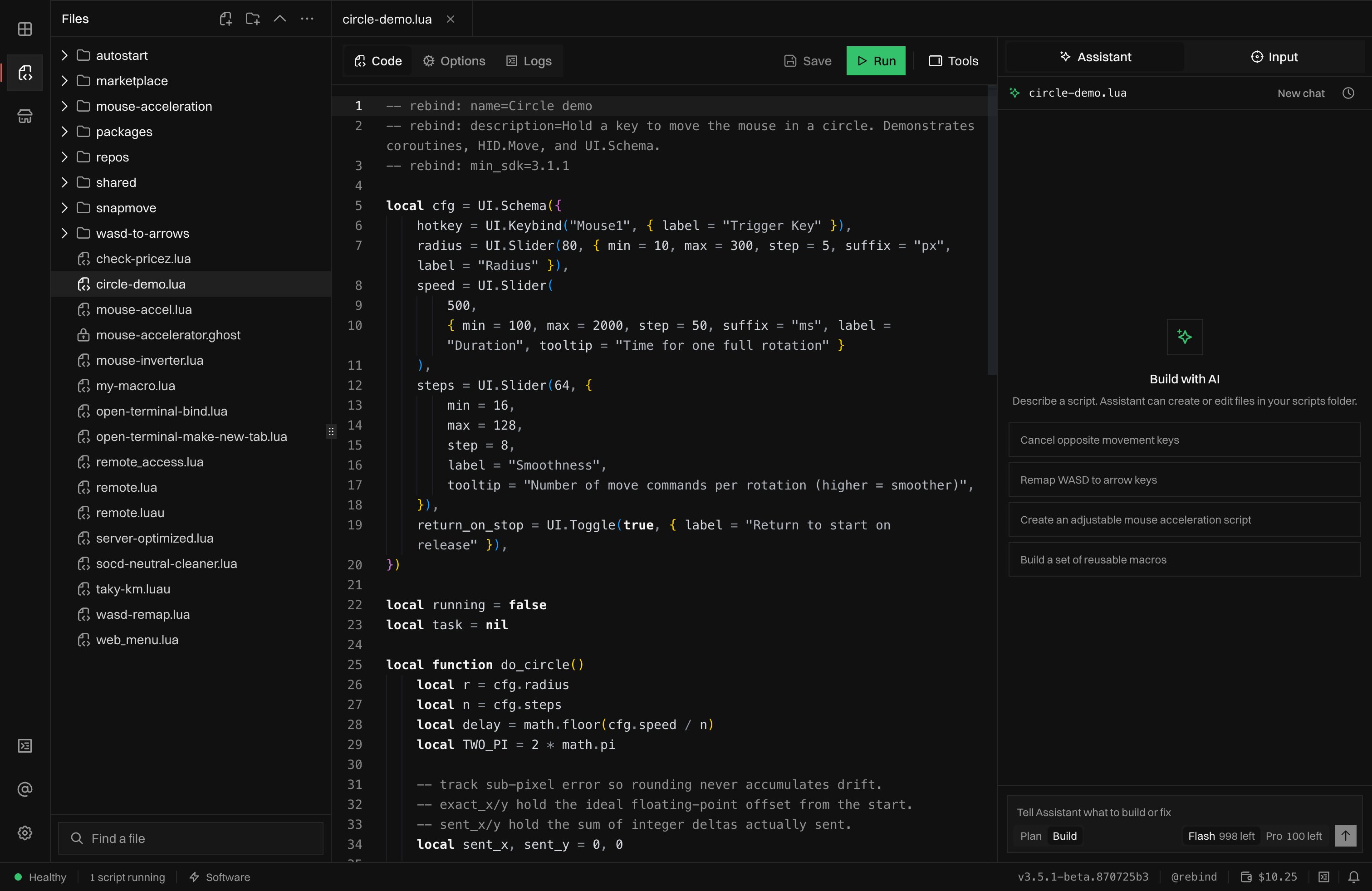
The Scripts tab: your script files on the left, the editor with Save and Run in the middle, and the Assistant, opened from Tools, on the right.
Where scripts live. The Scripts tab edits realHow it reads:.lua/.luaufiles on disk, in your Rebind scripts folder:Subfolders are fine for organization, edits made in an external editor are picked up live, and
- Windows:
%APPDATA%\Rebind\scripts- macOS:
~/Library/Application Support/Rebind/scripts- Linux:
~/.local/share/Rebind/scriptsrequire()resolves modules relative to a script’s own folder. With Pro, Cloud backups in Settings saves your scripts, macros, and settings to your account. It runs only when you ask.
- The
--[[ rebind: … ]]block at the top is the modeline: the script’s configuration. Onerebind:line per setting usually reads best, but repeatable keys such asprocess=may share a line. A terse single-line-- rebind: key=valueform works too. min_sdkis required. It’s the minimum Rebind version the script needs, and Rebind refuses to run any bare script whose modeline doesn’t declare it (a script inside a package inherits it fromrebind.toml). These examples use3.0.0; a script that asks for a version newer than your installed build is refused until you update.name=is the script’s display name. Every other modeline key is optional. See the SDK reference for the full list.Bind.Remap(from, to)takes two key names: the key you press and the key that’s sent instead. It installs the remap for as long as the script runs.
OnDown hook directly. It fires on every key press with the key name, and returning false blocks the original key from passing through:
Bind.Remap is the shorter path for a one-to-one remap; OnDown gives you room to add conditions and logic.
Kill switch
PressLeft Ctrl + Left Alt + K at any time to immediately stop all scripts and release every held key, restoring normal keyboard and mouse behavior. (The kill switch is the left-hand modifiers specifically; right Ctrl / right Alt don’t trigger it.) Keep it in mind whenever you run a script that blocks input.
Uninstall
On Windows, run Uninstall Rebind from the Start menu. On macOS and Linux, runsudo ~/.rebind/uninstall.sh. Helper tools the installer added, such as
QEMU, stay installed.