

Lifecycle
Every script follows a predictable lifecycle:OnStart()/OnStop(): set up and tear down (start timers, cancel tasks, release keys).OnFocus(window)/OnBlur(window): fire when a targeted app gains or loses focus (see Targeting).OnTick(dtMs): runs on a fixed cadence while the script is active; the tick rate,dtMssemantics, and limits are in the SDK reference.OnDown/OnUp/OnMove/OnScroll: input events, covered next.
OnFocus/OnBlur never fire. See Hooks for the exact signatures.
Input and blocking
Input hooks fire when physical input arrives from your captured devices. Their return value decides whether your PC sees the input:return true: input passes through normally.return false: input is swallowed; the PC never sees it.- no return /
return nil: same asreturn true.
HID.
PreferBindis the declarative shortcut for simple remaps and uses the opposite default: it blocks unless youreturn true. See Bind.
Bind when you only care about specific keys. Defining OnDown or
OnUp makes Rebind intercept every key system-wide; the SDK reference
covers this exclusive-capture behavior and the key_block=false opt-out.
Mouse moves are handled differently, and they need hardware. Any script that
defines OnMove requires a Rebind device: Rebind refuses to load an
OnMove script in software mode. Key, button, and scroll blocking work in both
modes; only mouse movement is hardware-gated in Rebind.
On a device, OnMove fires asynchronously by default: the move is forwarded to
your PC immediately and the return value is ignored, so script time never sits in
the mouse path. To modify or swallow moves (acceleration curves, cursor smoothing),
add mouse_block=true to the modeline; then the return value matters:
"A", "LCtrl", "Mouse1", …). The complete list (every alias and which keys are input- or output-only) is in the Key reference.
Sending output
TheHID namespace sends keyboard and mouse output through the active transport; it appears as real input to your PC.
HID.Down/HID.Uphold and release a key across time.HID.Combofires a whole chord in one call;HID.Presstaps a key (optional hold in ms);HID.Typesends a string through the active transport in one call.- Use
+for modifier combos:HID.Combo("LCtrl+V")presses in order and releases in reverse.
HID.Combo,HID.Down, andHID.Upare non-blocking and safe anywhere, including an input hook or aBindaction.HID.Typeneeds no coroutine, but hardware typing emits per-character reports and can occupy the calling hook.HID.PressandHID.Typewriteruse an internalSleep, so they must run inside aRun()coroutine or anAsync()handler.
HID.Type submits text in one call. Character coverage and timing depend on the
active transport and keyboard layout; see Transport key support.
For a controlled per-character delay, use HID.Typewriter(text, delayMs?)
(coroutine only). For very long or arbitrary Unicode text, paste is still an
option where Clipboard is supported:
Software-mode gotcha: a physical modifier the user is holding is merged
into your synthetic output: a swallowed key re-emitted while Shift is down
still carries Shift. That’s correct for remaps, but a macro that types text
while a modifier is held will inherit it. For output that must be clean of
physical modifiers, gate on Input.GetModifiers() first. Hardware output is
not a general modifier-isolation guarantee.
Doing things over time
For sequences, delays, and loops, useRun() and Sleep():
Run() launches a coroutine that executes concurrently; Sleep() pauses that coroutine without blocking anything else, and is only valid inside a Run() block. Reach for:
After(ms, fn): a one-off delay without theRun/Sleepboilerplate.Async(fn): wrap a callback so it runs in a coroutine; use it forBindcallbacks that needSleep.Timer.After/Timer.Every: simple delayed or repeated callbacks, when you don’t want to manage a coroutine loop yourself.
Coroutines are cooperative and tick-driven.Sleepresumes on the next engine tick past its deadline, so its timing is tick-granular rather than exact milliseconds, and aRun()body that never callsSleepruns straight through on a single tick. An infinite loop with noSleepstalls the script (input freezes) until the runtime’s execution budget cuts it off withscript execution budget exceeded. Always put aSleepinside long-running loops.
Run() returns a handle (task:Cancel(), task:IsRunning()). Cancel long-running tasks in OnStop/OnBlur so they don’t leak:
Reading state
When you need to know what’s happening right now rather than waiting for an event, poll it:Inputreports currently held keys, modifiers, and how long a key has been down, useful insideOnTickor aRun()loop.Systemgives the current time, cursor position, screen size, and focused window, refreshed each tick.
System.Time in use.
Config panels
A script can define a settings panel that appears in the Rebind UI, so users tune it without editing code.UI.Schema declares the controls; you read and write values through the returned handle, and they persist automatically (keyed to the script’s file path). The panel is available before the script runs, including controls added in loops or from required modules:
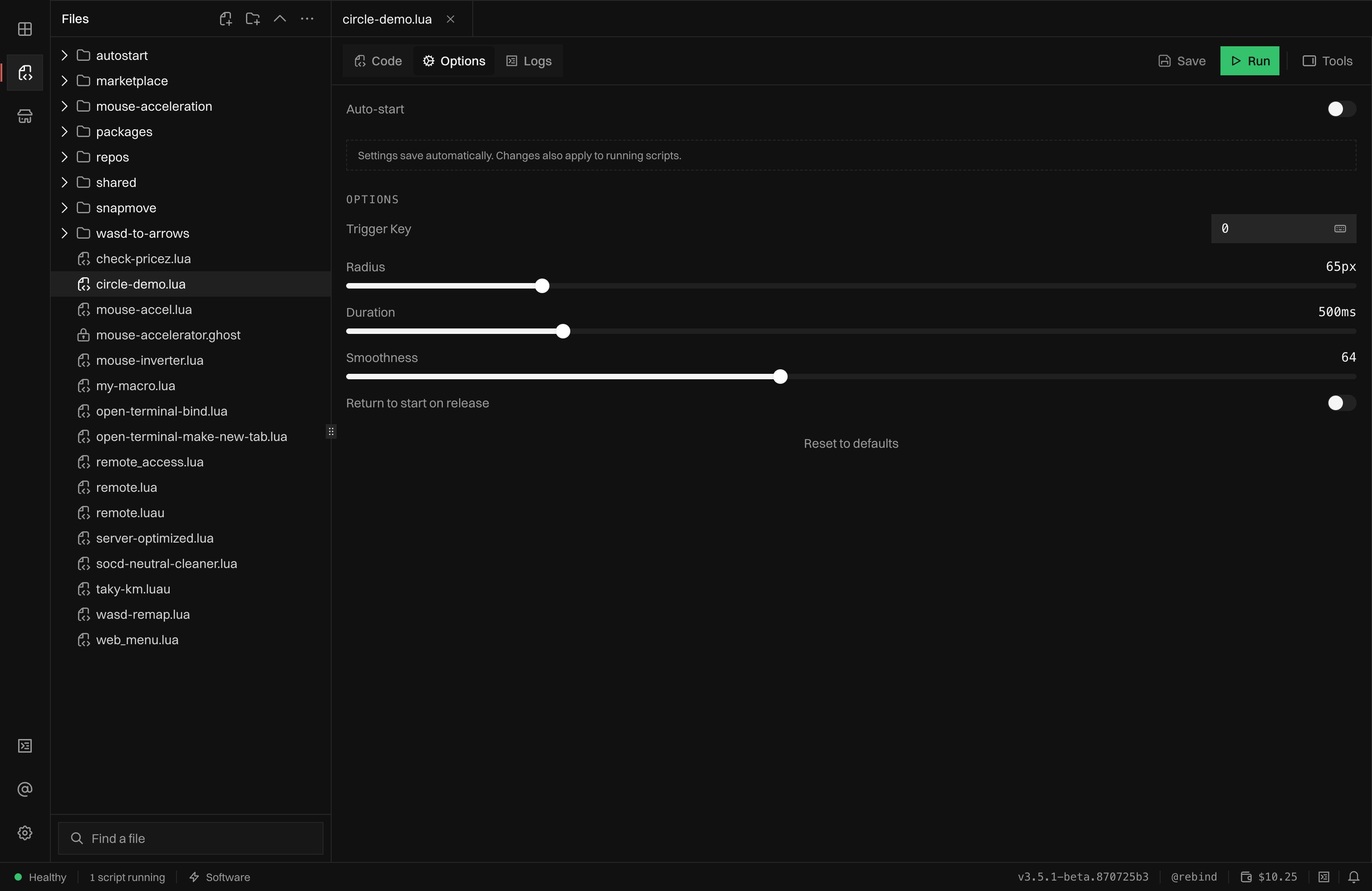
A script's Options tab, rendered from its UI.Schema: keybind, sliders, toggles, and auto-start. Changes apply live.
Splitting across files (require)
As a script grows, pull shared logic into its own file and load it withrequire(). A module is just a .luau / .lua file that returns a value,
usually a table:
require resolves relative to the script’s own directory, dots are path
separators (require("lib.math") loads lib/math.luau), modules are cached
after the first load, and paths that climb out with .. are rejected: local
files only. Saved macros are the one shared folder: require("macros/<name>")
reaches the macros folder of your scripts from any script. The exact
resolution order and sandboxing rules are in the
require reference.
Only the script you run needs amin_sdkmodeline; arequire’d module needs none. See Modeline.
Macros
Macro.Play plays back a recorded input sequence: a table of move/press/scroll/sleep actions. Reach for a macro when you have a fixed sequence to replay; use raw HID calls when the output depends on logic. Patterns can be transformed before playback (Math.Scale, Math.Spline, Math.Resample). See the Macro reference for the action format and playback modes.
Targeting and the always-on model
Restrict a script to specific applications with modeline targeting.window= matches a case-insensitive substring of the focused window’s title (so window=code also matches “Visual Studio Code”); process= matches the process name the same way. Repeat either key on one line or across several lines. Positive window and process rules combine with OR:
window_regex= and process_regex= when one expression is clearer than several literals. Regular expressions are case-insensitive. Rust regex syntax applies, so lookaround and backreferences are not supported:
min_sdk=3.4.1 or newer. This makes an older Rebind build refuse the script instead of ignoring targeting keys it does not understand.
OnStart still runs when a targeted script loads. While its target does not match, input hooks, timers, coroutines, and OnTick stay inactive. Only scripts matching the focused window process input:
z_index controls which sees input first (a false return blocks lower-priority scripts), and instance controls what happens when a script loads while a copy is already running. platforms names the operating systems a script supports; Rebind refuses to load it elsewhere. Full targeting rules and every key are in the Modeline reference.
Patterns
Common shapes that compose the pieces above.Toggle
Hold loop
Double-tap
Style
Rebind scripts are Luau. The conventions every example in these docs follows:- Indent with 2 spaces. Never tabs, never 4.
- Naming: runtime hooks and SDK calls are
PascalCase. That is dictated, not a choice (OnDown,HID.Press,Input.IsDown). Your locals and local functions aresnake_case(dwell_start,local function set_virt). Module-level constants areUPPER_SNAKE. The UI config table is conventionally namedcfg. localeverything. The only globals are the runtime hooks (OnStart,OnDown, …); declare everything elselocal, including functions.- Double-quoted strings. Use
[[ ]]long strings for regex patterns and multi-line text. - Stay flat: early return. Guard and
returnrather than nesting; usea and b or cfor a ternary. - Types are optional but welcome. Luau is typed; annotate where it
clarifies (
local count: number = 0), don’t annotate the obvious. - Comments: explain why, not what, and stay sparse. Lowercase.
--for a single line; one--[[ ]]block instead of stacking several--lines. - Keep lines to roughly 80 characters; space after commas and around operators; one statement per line.
Validation
The runtime lints your script on load and warns (in the Logs tab, without blocking the load) about common issues:- No hooks defined: no hook and no
Bindwas registered, so the script loads but never runs any logic. Net.Get/Net.Postin a script withOnTickand atick_rateabove 1000: an HTTP request per tick at that rate is almost always a mistake. Move it insideRun()(where the client methods must run anyway) or onto aTimerwith a longer interval.Net.WSListenandNet.WSConnectare exempt from theRun()requirement: their socket I/O runs on dedicated threads.Net.UDPListenis exempt too: it never blocks.
Type checking
The in-app editor includes Rebind SDK autocomplete and hover information. For VS Code or another external editor, follow Editor setup to load the samerebind.d.luau definitions into the Luau Language Server.